business [at] webideasole [dot] com

Loading...

This isn’t simply another 5-7 minutes Medium post about new tricks, new stuff, or whatever else. This will not teach you anything new, but it will teach you how to better understand something you already know. Yes, we’re talking about coding that’s consistent and well-organized. “Life is a never-ending succession of trainwrecks with only occasional, commercial-like intervals of happiness,” Deadpool once said. This is very relatable if you are a committed coder. In fact, as experienced developers, we write BUGs 90% of the time and debug and resolve them 10% of the time (obviously copied, xD). And we’re all aware of how difficult debugging may be. So, if you stick to a structure, a set of rules, and a set of styles, this arduous task will become a lot easier. Isn’t this the latest fad? Write as readable code as feasible. So, here’s the deal: follow a few guidelines so that others can read your code as if it were written in their native tongue. We’ll use JavaScript as an example in this blog, but you can easily apply similar concepts to any other language.
From:
if(flag)
{
printTrue();
}

To:
flag && printTrue()
// You can skip the else block
function hello(name) {
  if (name) {
    return name;
  } else {
    return null;
  }
}

// much easier to read
function hello(name) {
  if (name) {
    return name;
  }

  return null;
}
function getFee(isMember) {
  return (isMember ? '$2.00' : '$10.00');
}
//check if the first condition holds
if (condition 1) {

    //if the second condition holds
    if (condition 2) {
        do something
    }
    //if the second condition does not hold
    else {
        do something else
    }

}
// if the first condition does not hold
else{

    //if the third condition holds
    if (condition 3) {
        do something
    }
    //if the third condition does not hold
    else {
        do something else
    }

}
To:
module1() {
//check if the first condition holds
if (condition 1) {

    //if the second condition holds
    if (condition 2) {
        do something
    }
    //if the second condition does not hold
    else {
        do something else
    }

}
}
module1() {
// if the first condition does not hold
if(!condition){

    //if the third condition holds
    if (condition 3) {
        do something
    }
    //if the third condition does not hold
    else {
        do something else
    }

}
}
const numbers = [4, 9, 16, 25];
const newArr = numbers.map(Math.sqrt)
const foo = null ?? 'default string';
console.log(foo);
// expected output: "default string"

const baz = 0 ?? 42;
console.log(baz);
// expected output: 0

Use optional chaining ?
const adventurer = {
  name: 'Alice',
  cat: {
    name: 'Dinah'
  }
};

const dogName = adventurer.dog?.name;
console.log(dogName);
// expected output: undefined

console.log(adventurer.someNonExistentMethod?.());
// expected output: undefined
From:
var array = [1,2,3]
let array = [1,2,3]

To:
const array = [1,2,3]
const constants = {
	name: ‘WIS’
}
Use constants.name rather using ‘WIS’
Most of us have the same problem that we fail to write a readable code and that’s why we had to refactor the code afterward But now luckily we have prettier, It is an optional code formatter and is very popular amongst the developers cause it’s automatically formats the code when we save the file. It can be integrated with most code editors and most interestingly it can format code written in:
When we are searching for Prettier and any other linter on the Internet we will find more related projects. These are not normally advised, but they can be useful in a variety of situations.
First, we have different plugins that let us run Prettier as if its a linter rule:
These plugins were useful when Prettier was new. By running Prettier to the existing linters, we didn’t have to reconfigure anything new and we can re-use our editor integrations for linters. However, you may now run prettier –check. and most editors have Prettier support.
The downsides of those plugins are:
Finally, some programmes, such as eslint —fix on files, run elegantly and then promptly.
These are helpful if some component of Prettier’s output renders it unsuitable for you. Then you may use something like eslint —fix –fix fix to clean it up for you. The disadvantage is that these tools are significantly slower than running Prettier alone.
For example, take the following code:
foo(arg1, arg2, arg3, arg4);
Because it fits on a single line, it will be kept. However, we’ve all run into this situation:
foo(reallyLongArg(), omgSoManyParameters(), IShouldRefactorThis(), isThereSeriouslyAnotherOne());
Suddenly our previous format for calling functions breaks down because this is too long. Prettier will conduct the laborious task of reprinting it in that format for you:
foo(
reallyLongArg(),
omgSoManyParameters(),
IShouldRefactorThis(),
isThereSeriouslyAnotherOne()
);
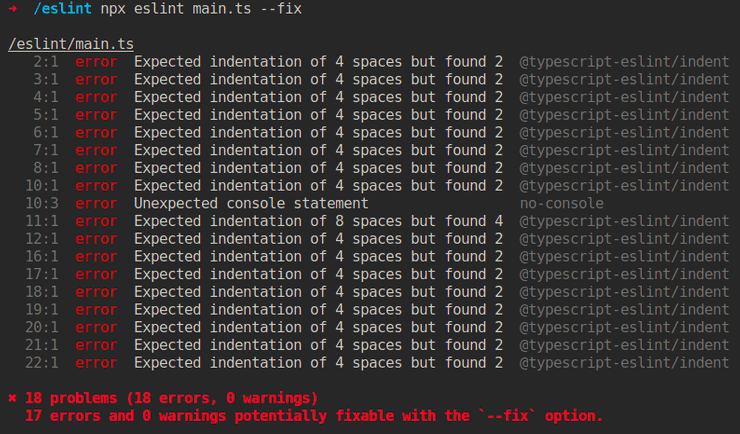
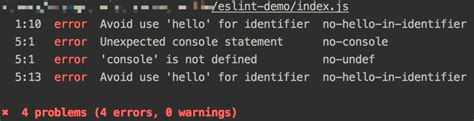
As a developer we all have to debug code and for that our primary source is printing each step. But who will check if we have removed all those print statements or the unwanted comment? ESLint is a tool to help developers in identifying each line and reporting on patterns found in ECMAScript / JavaScript code, with a goal to make the code more readable, bug-free and consistent. With a few exceptions, it’s a lot like JSLint and JSHint:
Prerequisites: Node.js (^12.22.0, ^14.17.0, or >=16.0.0)
Using npm or yarn, you may install ESLint:
npm install eslint –save-dev
# or
yarn add eslint –dev
The quickest method to achieve this is to create a configuration file as follows:
npm init @eslint/config
# or
yarn create @eslint/config
Following that, you can run ESLint on any file or directory, as seen below:
npx eslint yourfile.js
# or
yarn run eslint yourfile.js
Note: Please refer to the migration guide if you are upgrading from a version before 1.0.0.
After running npm init @eslint/config, you’ll have a .eslintrc.{js,yml,json} file in your directory. It contains the following rules:
{
    "rules": {
        "semi": ["error", "always"],
        "quotes": ["error", "double"]
    }
}
Enforces return statements in callbacks of array's methods.
// example: convert ['a', 'b', 'c'] --> {a: 0, b: 1, c: 2}
var indexMap = myArray.reduce(function(memo, item, index) {
  memo[item] = index;
}, {}); // Error: cannot set property 'b' of undefined
Disallows the use of Console.Log.
// eslint-disable-next-line no-console
console.error = function (message) {
  throw new Error(message);
};
// or
console.error = function (message) {  // eslint-disable-line no-console
  throw new Error(message);
};
Some of the errors highlighted by this rule can be fixed automatically using the –fix option on the command line.
Disallows return before else.
If an if the block includes a return statement, the else block is no longer required. Its contents are not restricted to the block.
function foo() {
    if (x) {
        return y;
    } else {
        return z;
    }
}
As a developer, the best practice is to use this helper tool to make our life easier i.e., By writing code that is also pleasing to the eyes of the reviewer. Using these tools we can write more readable code, elegant, bug-free, and industry-standard code.

GOURAB NEOGI
Senior Application Developer

REEJU BHATTACHERJI
Application Developer



Reach out, we’d love to hear from you!